






How to Work From Home: A Practical Guide to Getting Started
Working from home involves more than moving your laptop to a spare corner. A reliable setup, suitable workspace and clear daily routine all affect how smoothly you can work from home over time. This guide covers what you need to get started, how to set up a practical home office, choose a desk that fits your needs and build habits that make WFH easier to manage.
What You Need to Work From Home
For a smooth start to WFH, the basics matter most: reliable technology, a consistent work area and enough space for daily tasks. These essentials should come before optional upgrades.
Reliable Internet and Essential Technology
A stable internet connection is essential for video calls, cloud software and file sharing, while a reliable computer supports day-to-day work without unnecessary interruptions. Depending on your role, you may also need a headset, webcam or external monitor, but it is worth checking what your employer already provides before buying additional equipment. If you access company systems remotely, use the VPN, multi-factor authentication or other security tools required by your employer.
A Dedicated Place to Work
A dedicated workspace can make it easier to switch into work mode and keep equipment organised. Even without a separate room, a quiet corner of a bedroom or living area can work well if there is enough space for your desk and chair and household activity does not interrupt calls or focused work.
A Functional Workspace for Daily Work
A practical home office desk and workspace should match the way you work, including desk size, monitor position, lighting, access to nearby power points and chair clearance. A laptop-only setup may need little space, while multiple monitors or paperwork require more desktop depth, so plan around your actual equipment rather than choosing furniture first.
How to Set Up Your Work From Home Workspace
Once the basics are in place, arrange your workspace around how you work. The right location, desk setup and organisation can reduce unnecessary adjustments and make the space easier to use.
Choose the Right Space for Your Home Office
Choose an area with manageable noise, suitable lighting and enough room for your desk and chair. Avoid strong screen glare and, where possible, keep the workspace away from busy household areas.
Set Up Your Desk, Chair and Monitor Properly
Adjust your desk and chair first, then position the monitor at a comfortable viewing height. When switching between sitting and standing, the monitor position may also need to change.
Fixed monitor stands often have limited adjustment. The 9am Home Flexible Adjustment Single Monitor Arm allows you to adjust screen height and angle more easily while freeing up desktop space.
Choose a Desk That Fits Your Work Setup
Choose a desk based on both your available space and the equipment you use every day. A laptop-only setup may need relatively little desktop space, while one or two monitors, a keyboard and paperwork require more room.
Before choosing a desk, check:
-
Available floor space and chair clearance
-
Number and size of monitors
-
Desk width and depth, based on your equipment and available space
-
Space for a monitor arm or other accessories
-
Access to power points and cable routing
Room around the desk matters just as much as the desktop itself. In a small bedroom, for example, a desk may hold two monitors comfortably but still leave too little space to pull out the chair or route cables safely.
Consider Sit-Stand Flexibility
Long stretches of WFH can easily turn into hours in the same position, especially when meetings and focused tasks happen at the same desk. A height-adjustable standing desk gives you more flexibility to change your working position during the day, making it easier to switch between sitting and standing as different tasks come up. If you are moving from a sitting desk to a standing desk, it is more practical to alternate positions gradually, such as standing for a short call and sitting again for detailed work, rather than trying to stand all day.

Keep Your Workspace Organised
Cable management becomes more important as a home office setup grows. A monitor, laptop charger and power board may work fine at sitting height, but once the desk is raised, short or loose cables can start pulling across the setup. The Under Desk Cable Management Tray keeps power boards, adapters and excess cables together beneath the desk, helping maintain a cleaner workspace and giving cables more room to move during height adjustment.
Best Desks for Working From Home
The right desk depends on your available space, working hours and setup priorities. When comparing standing desks, focus on how each option fits the way you actually work from home rather than specifications alone.
Best Desk for Small Home Offices
Small apartments, bedrooms and compact home offices need a desk that provides enough workspace without taking over the room. The Atom Home Office Mini Adjustable Standing Desk balances a smaller footprint with everyday workspace while retaining the flexibility to switch between sitting and standing.
Best Desk for Long Workdays at Home
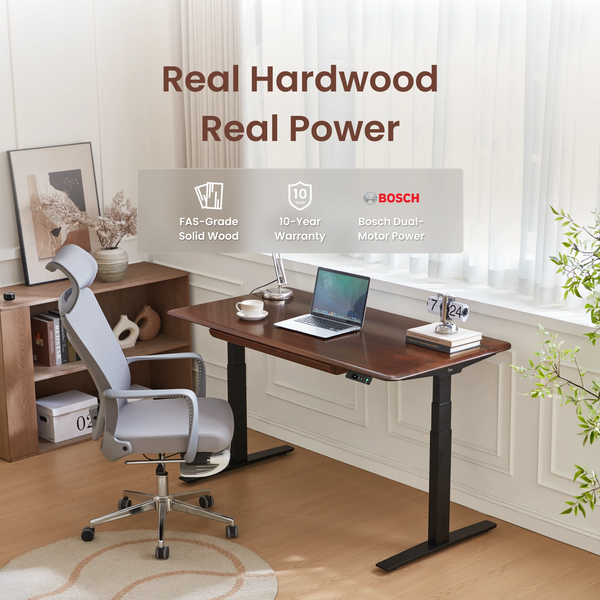
If you work from home for several hours a day, desk stability and long-term usability become more important. The Pesk Pro Hardwood Home Office Electric Standing Desk combines reinforced legs and feet with Bosch dual motors for more stable sit-stand adjustment. Its premium hardwood desktop and 3D curved edge also suit users who value natural materials and a desk designed for long-term home office use.
Best Desk for a Stylish Home Workspace
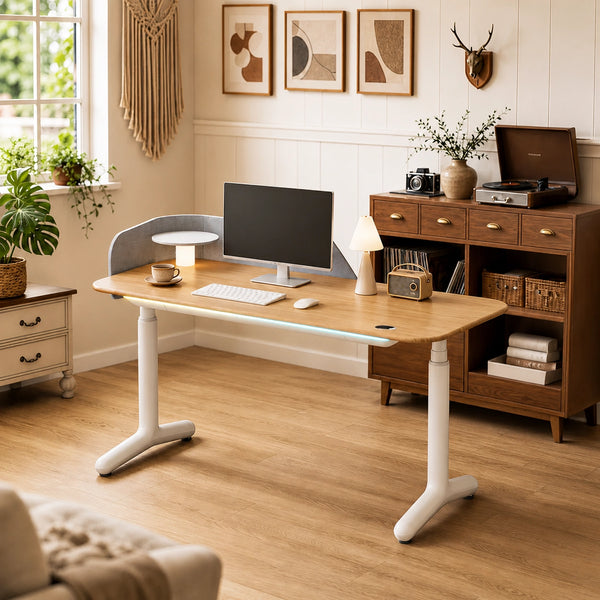
When a desk sits in a bedroom, living area or open-plan study, it becomes part of the home interior as well as a place to work. The Dora Pro Hardwood Smart Electric Standing Desk combines premium desktop options with an integrated drawer and cable management, while its smart features add more convenience to everyday sit-stand use. It suits home workspaces where a clean, considered look matters, but where the desk also needs to adapt naturally to daily working habits.
Best Desk for Easy Home Office Setup
When you are new to WFH, a complicated desk installation adds extra work to an already busy setup process. The Robin Pro Dual Motors Melamine Top Home Sit Stand Desk uses a tool-free quick-assembly design with triangular legs for stable support. If keeping the initial WFH cost lower is the priority, the Robin Dual Motor Sit Stand Desk offers a more basic starting point.
How to Build a Work From Home Routine
A simple routine helps separate work from home life and makes the day easier to manage.

Set Consistent Working Hours
Set a regular start and finish time based on your role and agreed working arrangement. Consistent hours make it easier to plan focused work, coordinate with colleagues and avoid letting work gradually extend into the evening.
Plan Your Daily Priorities
Identify the most important tasks before messages and smaller requests take over your attention. Prioritise work that requires more concentration during your most productive hours, then fit lower-priority tasks around it.
Change Positions Throughout the Day
Use meetings, task changes or short breaks as reminders to move instead of staying in one position for hours. Alternating between sitting, standing and brief periods away from the desk can make movement a natural part of the workday.
Create an End-of-Day Routine
Finish essential messages, review the next day’s priorities and close work applications before you stop. A short shutdown routine helps create a clearer boundary between working time and the rest of your day.
Tips for Staying Productive When Working From Home
Staying productive at home is often less about working longer and more about reducing everyday interruptions. A few practical habits can help you stay focused while keeping the workday flexible and manageable.
Reduce Everyday Distractions
Limit unnecessary notifications and choose the quietest practical area for focused work. If you share your home with others, make important meeting times or concentration periods clear so interruptions are easier to manage.
Keep Your Most Important Tasks in Focus
Do not let every email or chat message become an immediate priority. Where your role allows, protect blocks of time for work that requires sustained attention and check lower-priority messages between those periods.
Step Away From Your Desk During Breaks
Try to use breaks as real time away from the screen rather than simply switching to another tab or device. A short walk, lunch away from the desk or a few minutes in another room can help create a clearer break between work periods.
Keep Your Workspace Ready for the Next Day
Clear unnecessary items, reconnect equipment and charge devices before finishing work. A workspace that is ready to use reduces setup time and makes it easier to start the next day without unnecessary friction.
Adjust Your Setup as Your Work Needs Change
Your WFH setup should change with your workload and equipment. If recurring issues appear, such as limited desk space, poor monitor positioning or difficult cable management, add only the desk accessories that solve the specific problem rather than replacing your whole setup.
Conclusion
Working from home effectively starts with reliable technology, a workspace that fits your daily tasks and a routine that creates clear boundaries between work and home life. You do not need to perfect everything at once; start with what you need now, then adjust your desk setup, equipment and habits as your work changes. The most practical WFH setup is one that fits your available space, supports how you actually work and remains easy to use day after day.
FAQ
Can I Legally Ask to Work From Home in Australia?
Yes. Anyone can ask to work from home. Some employees who have worked for the same employer for at least 12 months have a legal right to request flexible working arrangements under the Fair Work Act, including eligible parents, carers, employees with disability, pregnant employees and employees aged 55 or older. Formal requests must be made in writing, and employers must respond within 21 days.
Can My Employer Require Me to Return to the Office?
Yes, if the direction is lawful and reasonable. However, an approved flexible work arrangement, employment contract, award or enterprise agreement may affect the situation. Eligible employees may also formally request to continue working from home.
What Work From Home Expenses Can I Claim on Tax in Australia?
You may be able to claim eligible working from home expenses if you incur additional costs while performing your employment duties at home. For the 2025–26 income year, the ATO fixed-rate method is 70 cents per hour worked from home, and appropriate records are required.
Do I Need a Dedicated Home Office to Claim Work From Home Expenses?
No. You can use the ATO fixed-rate method without a dedicated home office, so working from a shared space such as a dining room does not automatically prevent a claim. A dedicated work area becomes relevant to some actual-cost expenses, such as cleaning, while employees can generally claim occupancy expenses only in limited circumstances.
Do Work Health and Safety Laws Apply When I Work From Home?
Yes. WHS duties continue to apply when you work from home. Employers must manage health and safety risks so far as reasonably practicable, while workers must take reasonable care and follow relevant safety procedures.
Do I Have the Right to Disconnect When Working From Home?
Yes. Australian employees can refuse to monitor, read or respond to work-related contact outside their working hours unless that refusal would be unreasonable. Factors include the reason for the contact, the employee’s role, how disruptive it is and whether they are compensated for being available outside normal hours.

Leave a comment