






Desk Chair for Studying: What to Look for in 2026
Choosing a desk chair for studying is less about finding the model with the most features and more about finding one that fits your body, study habits, and available space. A chair that works well for short homework sessions may not provide the same support for long hours of writing, online classes, or exam preparation.
This guide explains what to look for in a study chair in 2026, including fit, ergonomic features, adjustability, materials, and how the chair should work with the rest of your study setup.
Key Factors to Consider in a Desk Chair for Studying
Start with how long you study, what tasks you usually do, and how much space is available around your desk. Before buying, also check the chair’s adjustment range and overall dimensions rather than relying on labels such as “ergonomic” or “one size fits most”.

Daily Study Time and Sitting Duration
The longer you study, the more useful adjustable features become. For extended sessions such as exam preparation, online classes, or assignment work, prioritise a seat depth that fits your thighs, armrests that can align with your desk, and a backrest that remains supportive as you change position.
Study Tasks and Work Habits
Typing, handwriting, reading and watching online lectures do not place your body in exactly the same position. A student might sit upright while writing an assignment, recline slightly during a recorded lecture, then move closer to the desk to take notes. If you regularly switch between these tasks, look for a chair that lets you adjust the armrests, backrest and seat position without having to reset your entire workstation.
Available Space Around the Desk
Measure the space around the desk before choosing a chair, especially in a bedroom or shared study area. For example, a chair may fit comfortably while you are sitting upright but hit the wall once you recline or stop sliding under the desk because the armrests are too high. Check the overall width, base footprint, armrest clearance and recline space before buying.
How Should a Study Chair Fit Your Body?
Check body fit before comparing extra features. Seat height, seat depth, armrest position and backrest contact are the main points to assess.
Seat Height and Leg Position
Set the seat height so your feet rest flat on the floor and your knees stay roughly level with, or slightly below, your hips. If the chair is too high, pressure can build under the thighs; if it is too low, the knees rise and the hips may feel compressed. The right height should let you sit close to the desk without lifting your shoulders to reach the keyboard.
Seat Depth and Thigh Support
Seat depth should support most of the thighs without pressing into the back of the knees. A seat that is too deep may make shorter users slide forward, while one that is too shallow can leave taller users with too little thigh support. When buying online, compare the listed seat depth with a chair that already fits you well, and look for adjustable seat depth if you are unsure.
Armrest Height and Shoulder Position
Armrests should support the forearms while allowing the shoulders to remain relaxed. If they are too high, the shoulders may lift; if they are too low, the arms receive little support and more weight shifts toward the desk. Adjustable armrests are particularly useful when the same study chair is used for typing, writing, and other desk tasks.
Backrest Position and Lower Back Fit
The backrest should make steady contact with the lower back without forcing you forward or leaving a noticeable gap around the lumbar area. Because body height and torso length vary, fixed backrests do not suit everyone equally. A better-fitting chair lets you sit against the backrest naturally while keeping the pelvis and upper body in a balanced position.
Which Ergonomic Features Matter Most?
More adjustments are not automatically better. Focus on the features you will actually use during your usual study tasks.
Adjustable Lumbar Support
Lumbar support only helps when it sits in the right place. If a fixed backrest does not align comfortably with your lower back, adjustable lumbar height or depth can make the chair easier to fit. It is especially useful for shared chairs or users who find fixed lumbar curves too high, too low or too firm.
Adjustable Armrests
Armrest height matters most when you spend a lot of time typing or using a mouse. The armrests should support your forearms without lifting your shoulders, and they should lower far enough for the chair to fit under the desk. Depth or angle adjustment is useful if you regularly switch between keyboard work, handwriting and reading.
Recline and Tilt Control
An upright position works well for focused computer tasks, but it may feel restrictive during reading or recorded lectures. Recline and tilt controls give you room to shift posture without losing back support, while adjustable resistance or locking positions help keep the movement controlled rather than loose.
Breathable and Supportive Seat Materials
In a warm bedroom or study space, airflow may matter more than extra cushioning. Mesh usually offers better ventilation, while a well-designed padded seat may provide a softer, more cushioned feel. The better choice depends less on the material name and more on whether the seat stays comfortable and supportive during the length of your usual study sessions.
How to Choose Features for Different Study Needs
The right features depend on how and where you study. A chair for long computer sessions may need more adjustment, while a small bedroom or warm study space may make size and ventilation more important.
More Adjustability for Longer Study Sessions
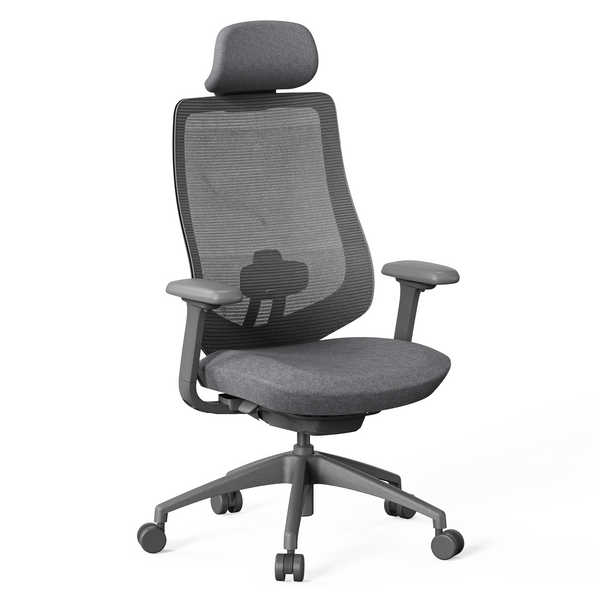
A long study session may include typing an essay, joining an online class and reading away from the keyboard, so one fixed sitting position is rarely enough. Independent seat-depth, armrest and recline adjustments make it easier to adapt the chair as the task changes. The 9am HOME Newton Ergonomic Chair combines adjustable seat depth, 4D armrests and four lockable recline positions, which suits students who regularly move between focused desk work and more relaxed reading or viewing.
More Leg and Back Support for Reading and Reclining
Reading or watching a lecture often involves more recline than typing at a desk, so back and leg support become more noticeable. A footrest is not essential for every study chair, but it can be useful if you recline frequently, have longer legs, or regularly use the chair for short breaks between study tasks.
Breathable Materials for Warm Study Spaces
A heavily padded chair can feel comfortable at first but become warm during a long afternoon of studying. In bedrooms, student accommodation, or spaces with limited cooling, breathable mesh can improve airflow around the back and seat. Cushioning can still work well, but the material should remain supportive without trapping excessive heat during your usual study time.
Compact Design for Small Study Areas
In a small bedroom or shared study area, a wide base or bulky armrests can become a daily annoyance even if the seat itself feels comfortable. Check whether the chair can slide under the desk, turn without hitting nearby furniture and recline without contacting the wall. Extra features have little value if there is not enough room to use them.

Build a More Comfortable Study Desk Setup
A well-fitted chair can still feel wrong if the desk or screen is positioned badly. Check the chair, desk, monitor and legroom as one setup rather than adjusting each item in isolation.
Set the Chair and Desk Height Together
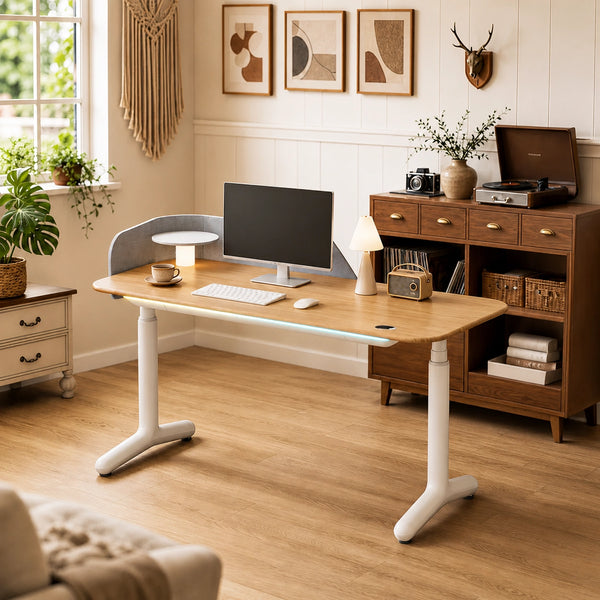
Once the chair is adjusted to support your legs and back, the desk should match that position rather than forcing you to compensate. A surface that is too high can lift the shoulders, while one that is too low may encourage you to lean forward. The 9am HOME Dora Pro Hardwood Smart Electric Standing Desk adjusts from 67 to 132 cm and supports sit-stand use with sitting reminders, so you can set the chair first and then bring the desktop to a more comfortable keyboard height.
Position the Screen Around Your Natural Viewing Height
A low screen can undo an otherwise well-adjusted setup by encouraging the head and neck to move forward. Instead of raising the chair just to reach a better viewing angle, adjust the monitor independently where possible. The 9am HOME Flexible Adjustment Single Monitor Arm Desk Mount supports 17–34-inch monitors weighing 2–9 kg, with adjustments for height, viewing distance, tilt, and rotation, which is useful when switching between reading, online classes, and computer-based study.
Keep the Area Under the Desk Clear
Cables, chargers and power boards can quickly take over the same floor space your feet and chair need. With a height-adjustable desk, loose cables can also become too tight when the desktop rises. The 9am HOME Under Desk Cable Management Tray Wire Organiser measures 60 × 15 × 6 cm and stores power boards, laptop chargers, adaptors and excess cable under the desktop, leaving more usable space around the legs.
Change Position During Longer Study Sessions
During longer study sessions, change position as the task changes rather than staying seated the same way for hours. Move between upright work, slight recline, standing and short walking breaks when practical. The aim is regular movement, not holding one fixed posture for an entire study session.
Conclusion
Choosing the right desk chair for studying starts with fit, study habits, and the amount of time you spend at the desk. Seat height, depth, back support, armrests, and recline should work together so the chair can adapt to both your body and the way you study.
The best choice is not necessarily the chair with the most features. A well-matched study chair should support your usual tasks, fit comfortably within your study space, and remain practical for longer sessions without forcing you into one fixed position.
FAQ
Can an office chair be used as a study chair?
Yes. A well-fitted office chair can work very well for studying if it offers suitable seat height, back support, and enough adjustability for your usual tasks. The label matters less than whether the chair fits your body and study routine.
Can the same study chair work for teenagers and adults?
Yes, but only if the adjustment range fits both users. A smaller teenager may need a lower seat height and shorter seat depth than an adult, so check these measurements rather than relying on an age label. If their feet cannot rest comfortably on the floor at the lowest setting, a footrest may be needed.
How long should a study chair last?
A good study chair can last several years, but lifespan depends on build quality, materials, daily use, and maintenance. Check moving parts, castors, armrests, upholstery, and adjustment mechanisms over time rather than judging the chair by age alone.
Is it better to buy a study chair and desk separately or as a set?
Buying them separately usually gives you more flexibility to match each item to your body and space. A set can be convenient, but the chair height, desk height, and overall dimensions still need to work together.
How do I know if a study chair is the right size for me?
The chair should let your feet rest flat, support most of your thighs without pressing behind the knees, and allow your back to contact the backrest naturally. You should also be able to use the armrests without lifting your shoulders or pushing your elbows too far out.
Should a study chair have wheels or fixed legs?
Wheels are useful when you regularly move between the desk, drawers or nearby storage, while fixed legs suit setups where the chair rarely needs to move. Also consider the floor surface: choose castors that are suitable for carpet or hard flooring so the chair moves safely without unnecessarily marking the surface.

Leave a comment