






Best Ergonomic Chair Australia: A Practical Buying Guide
A chair that feels comfortable for a few minutes may be less comfortable after a morning at your desk. You might find the seat presses behind your knees, the armrests get in the way, or you cannot lean back comfortably. These details are worth checking when choosing a chair for regular work.
If you’re shopping for an ergonomic chair in Australia, this guide will help you compare fit, adjustments, materials, and price, along with the delivery and return conditions to check before ordering.
What Makes an Office Chair Ergonomic?
An ergonomic chair lets you adjust the seat, backrest, and armrests to suit your body and the way you work. It is one part of a practical ergonomic desk setup, where the chair, work surface, and screen work together. These features should help you sit comfortably, reach your keyboard without straining, and lean back when you need a change of position.

Adjustable Seat Height and Depth
Seat height and depth determine how comfortably you can sit back in the chair. Your feet should rest on the floor or a footrest, while the seat supports your thighs without pressing behind your knees. Being able to adjust both makes it easier to find a comfortable fit.
Lumbar and Back Support
A well-fitting backrest supports the natural curve of your lower back when you sit against it. Lumbar support should feel gentle, without digging into your back or pushing you forward. Where adjustment is available, you can change its position to suit your body.
Armrest, Recline, and Tilt Adjustments
Adjustable armrests allow your forearms to rest comfortably while your shoulders stay relaxed. They also need to clear the desk so you can reach the keyboard. Recline and tilt settings give you room to change position, with suitable resistance supporting you as you lean back.
Supportive and Breathable Materials
The seat should feel supportive without creating pressure around its edges. Mesh generally allows more airflow, which can be welcome in a warm Australian home office. Fabric upholstery may provide a more cushioned feel, depending on its construction. With either option, consider how it feels during use and how easily it can be cleaned.
What Should You Check Before Buying an Ergonomic Chair?
Before choosing a chair, consider how well it suits your body and office desk setup. Alongside the dimensions and adjustments, check the warranty, return conditions, and delivery costs so you know what to expect when ordering.
Check the Chair’s Dimensions, Height Range, and Weight Capacity
Measure the space you have and compare seat width, depth, backrest size, and height range. A recommended user-height range is only a guide: two people of the same height may need different seat depths. WorkSafe Queensland’s advice on selecting office chairs recognises that no single size suits everyone.
Match the Adjustments to Your Work Style
For spreadsheet work at a home office desk, seat fit and armrest clearance may matter more than a deep recline. Someone who frequently reads documents or takes calls away from the keyboard may use the backrest’s movement more often.
Compare Materials, Build Quality, and Floor Compatibility
Can you reach the controls without struggling? Does the base feel steady when you move? Also check the castors: carpet, tiles, and timber present different demands, and some floors may need compatible wheels or a protective mat.
Review the Warranty, Returns, and Australian Delivery
Read the warranty, return policy, and delivery details before ordering. Find out which parts are covered and what return freight could cost. Apartment residents should confirm where delivery stops. For 9am HOME purchases, clarify return eligibility before assembly: the published conditions require no signs of installation or use.
Read Reviews From Users With Similar Needs
A tall reviewer’s comfortable seat may be too deep for you. Look for people who describe their height, build, and working hours, then read what they say about fit after several weeks.
A Practical Choice for Daily Work: 9am HOME Newton Computer Gaming Office Home Ergonomic Chair
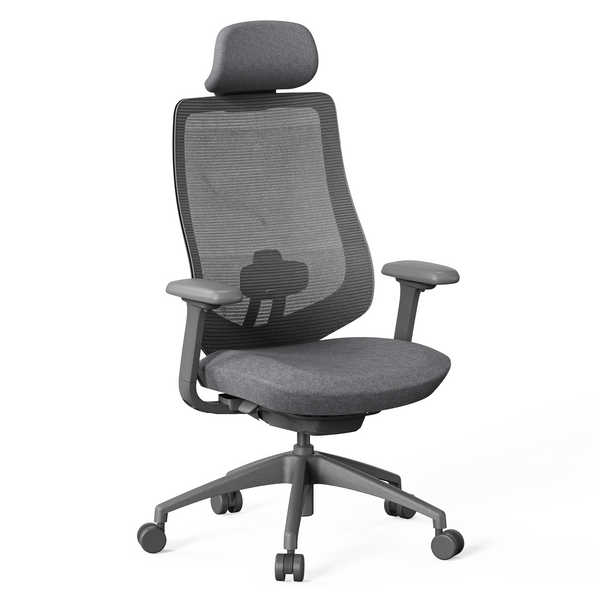
If you spend most weekdays at your desk, being able to adjust both seat height and depth is useful. The 9am HOME Newton Computer Gaming Office Home Ergonomic Chair offers a 43–54 cm seat-height range and up to 60 mm of seat-depth adjustment. Its listed height recommendation is 150–190 cm, with a maximum weight capacity of 135 kg.
For typing, the 4D armrests allow you to reposition the support around your arms and desk. When you lean back to read, the weight-responsive synchronised recline and four lockable positions offer more choice. The chair also includes an S Curve™ backrest and breathable Gabriel® performance fabric.
These features make it worth considering for everyday home-office use, provided the seat dimensions and adjustment range suit you.
How Much Should You Spend on an Ergonomic Chair in Australia?
Think about how often you will use the chair before setting a budget. The following Australian-dollar bands are planning examples, rather than firm market categories.
Entry-Level Chairs for Occasional Use
A chair for weekend paperwork may need fewer adjustments than one used all week. Basic height and tilt controls can be enough when the seat fits, but back support and a stable base still matter.
Mid-Range Chairs for Regular Home Office Work
For regular working days, put more of the budget towards seat-depth adjustment, usable armrests, and a comfortable recline mechanism.
Premium Chairs for Long Daily Use
At a higher price, look for a clear benefit: a particular seat size, more refined controls, or upholstery you prefer. If the extra features do not address your needs, spending more may add little to everyday comfort.
| Planning budget | Best for | Features to look for | What to check |
|---|---|---|---|
| Under A$300 | Occasional use | Height adjustment and basic tilt | Seat fit and stability |
| A$700 | Regular home-office work | Seat-depth, armrest, and recline adjustment | Adjustment range and warranty |
| Above A$700 | Frequent use or specific fit requirements | More refined mechanisms and materials | What the additional cost delivers |
Include delivery in the total, and compare the features you need before deciding which price band suits you.
How Should You Set Up and Use an Ergonomic Chair?
Once your chair is assembled, adjust it at your desk while doing a few everyday tasks. Typing, using the mouse, and leaning back to read will help you judge whether the settings feel comfortable.
Adjust the Seat and Lumbar Support
Start with the seat height so your feet rest on the floor or a footrest. Then adjust the depth to support your thighs while leaving a small gap behind your knees. If the lumbar support is adjustable, position it where it comfortably supports your lower back.
Position the Armrests, Desk, and Monitor
Rest your hands on the keyboard and check that your shoulders remain relaxed. The armrests should support your forearms without stopping you from sitting close to the desk. For the screen, WorkSafe Queensland recommends roughly an arm’s length of viewing distance, with the top near eye level or below, adjusted to suit your vision.
Avoid Staying in One Position for Too Long
Even with a comfortable chair, sitting in one position for hours can leave you feeling stiff. Prolonged sitting is also associated with health risks, including heart disease and type 2 diabetes. Short walks and regular position changes help break up seated work. To make these habits easier to remember, 9am HOME’s smart desk controller includes a sedentary reminder—a useful cue when you lose track of time at your desk. Our guide to improving posture during the workday shares more practical tips.
Recheck Your Chair Settings Over Time
Revisit the settings when you change your desk setup or share the chair with someone else. A quick check of seat height, depth, and armrest position can help you settle comfortably into work without readjusting throughout the day.
Tips for Creating an Ergonomic Workspace
A comfortable workspace depends on how your chair, desk, and equipment work together. Once the chair fits you, a few changes to the surrounding layout can make everyday tasks easier.

Coordinate Your Chair, Desk, and Monitor
Set your chair so your feet and back are supported, then check that you can type with relaxed shoulders. Raise the screen if you need to bend your neck to read it; for a laptop, a separate keyboard and mouse allow independent adjustment. Our ergonomic desk setup guide explains the process.
Combine an Ergonomic Chair With a Standing Desk
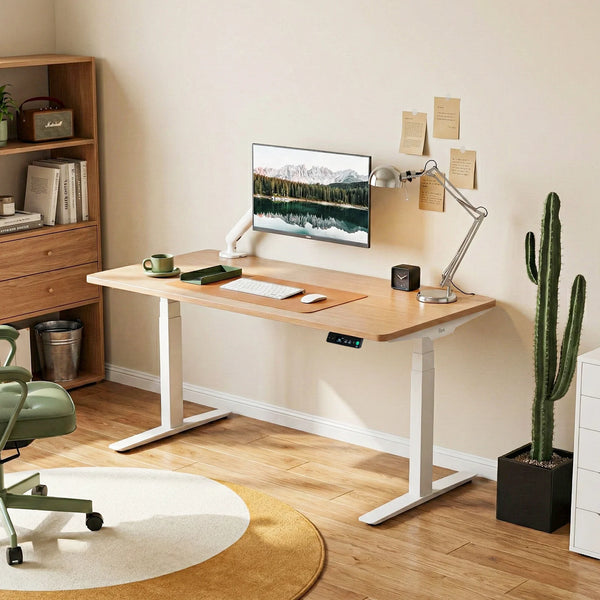
A height-adjustable desk lets you set a comfortable working height for sitting and raise it when you want to stand. In a small study nook, the 9am HOME Atom Home Office Mini Adjustable Standing Desk offers a compact option. For two monitors and paperwork, consider a larger desktop from the 9am HOME Pesk Dual Motors Melamine Home Office Electric Standing Desk range.
Choose enough surface space for your equipment while leaving room to move around the desk.
Keep Essential Items Within Easy Reach
Keep the mouse beside the keyboard and place frequently used items, such as your notebook or phone, within comfortable reach. If you regularly stretch across the desk or twist to pick something up, move it closer rather than adjusting your sitting position around it.
Leave Space for Movement
Keep boxes and cables out of the space beneath the desk so your legs can move freely. There should also be enough room to pull the chair back and stand up easily, especially if your home office shares space with other furniture.
Adjust the Setup as Your Routine Changes
Recheck the layout when you add a monitor, change desks, or share the workspace. Another user may need different chair settings, while new equipment can affect screen distance and keyboard placement. Make small adjustments as needed instead of keeping an arrangement that no longer feels comfortable.
Conclusion
Start with the problems you want the chair to solve, then compare fit, adjustments, and purchase conditions. Once it arrives, take time to set it up with your desk and monitor. A good choice should make ordinary working tasks more comfortable while allowing you to change position easily.
Frequently Asked Questions
What Is the Best Ergonomic Chair for Working From Home?
Look for a seat that fits, comfortable back support, and adjustments you can use at your desk. For daily work, seat-depth adjustment and armrest clearance are particularly useful.
How Much Should I Spend on an Ergonomic Chair in Australia?
A$300–A$700 is a reasonable planning budget for regular home-office use. Include delivery, and spend more only where a feature or fit requirement makes it worthwhile.
Is a Mesh or Fabric Office Chair Better?
Neither is better for everyone. Mesh generally allows more airflow, which can be useful in a warm home office. Fabric upholstery may feel softer, although comfort depends on the cushioning and seat construction.
If possible, try both. Check whether the seat feels supportive, whether its edges create pressure, and how easily the material can be cleaned.
How Do I Know if an Ergonomic Chair Fits Me?
Sit back against the backrest and check that:
- Your feet rest comfortably on the floor or a footrest.
- The seat supports your thighs without pressing behind your knees.
- Your hips have enough room, and the backrest supports your lower back.
- You can reach the keyboard with relaxed shoulders and elbows close to your sides.
Test the chair while typing and leaning back, not just while sitting still. If you must perch on the seat edge to reach the desk, recheck the chair settings and desk height.
Can an Ergonomic Chair Help With Back Pain?
Better support may ease discomfort from an unsuitable setup, but a chair cannot address every cause of pain. Review screen and desk placement, take movement breaks, and seek professional advice if symptoms persist or worsen.

Leave a comment