






How to Care for a Wood Desk: Cleaning and Maintenance Tips
A wood desk comes into contact with keyboards, mice, drinks, and other office essentials every day, so dust, moisture, heat, and repeated friction can gradually leave marks on the surface. Good wood desk care is less about frequent cleaning and more about preventing unnecessary wear and using methods that suit the existing finish.
This guide covers everyday protection, step by step cleaning, long-term maintenance, and what to consider when choosing a wood desk for long-term use.
Why Does a Wood Desk Need Regular Care?
Daily use inevitably leaves its mark on a wood desk, including solid wood desktops. Over time, exposure to dust, moisture, heat, and repeated contact can wear the surface, making regular care important for limiting avoidable damage and maintaining its condition.
Daily Use Can Gradually Wear the Surface
Keyboard and mouse movement, writing, monitor stands, and other desk accessories can create fine scratches or worn areas, especially in high-use zones. Drinks may also leave moisture marks, while hot items can affect some surface finishes. Because most of this damage develops slowly, simple daily protection is usually more effective than trying to repair visible wear later.
Small Signs of Wear Can Become More Noticeable Over Time
A small water mark near a drink or slight wear where the mouse moves may be easy to ignore at first. As the finish is repeatedly exposed to moisture, friction, or sunlight, those areas can become more visible and the wood beneath may become easier to stain. Checking the surface while cleaning makes it easier to deal with early wear before it becomes harder to correct.
Regular Care Can Help Extend the Desk’s Lifespan
Frequent cleaning is not what keeps a wood desk in good condition. A coaster under your morning coffee, a mat beneath the keyboard and mouse, and prompt spill cleanup can prevent much of the wear that builds up during daily use. Matching the cleaning method to the finish and avoiding large changes in heat or humidity can also help reduce fading, drying, swelling, and warping.
How to Protect a Wood Desk From Daily Damage
Most everyday damage to a wood desk comes from friction, moisture, heat, and moving heavy objects. Simple protective habits can help reduce scratches, stains, and surface wear over time.

Use Coasters and Desk Mats in High-Use Areas
Keyboard and mouse movement, writing, and drinks tend to affect the same areas every day, which can gradually lead to fine scratches, worn patches, or water marks. Coasters protect smaller contact points, while a desk mat can cover the main keyboard and mouse area.
The 9am Home Leather Large Double-Sided Office Computer Desk Mat measures 800 × 400 mm and uses double-sided PU leather with an anti-slip, waterproof surface. This gives frequently used parts of a wooden desktop an extra layer of protection from friction and everyday spills.
Wipe Up Spills Before Moisture Sits Too Long
Water, coffee, and condensation can leave marks if they remain on the surface for too long, even on some sealed wood desks. Blot spills promptly with a soft cloth and dry the area thoroughly, as repeated wetting and drying can place additional stress on exposed or poorly protected wood. If the spill contains sugar or oil, avoid aggressive rubbing, which may spread the residue or affect the finish.
Keep Hot Items Away From the Surface
A hot coffee mug or warm laptop placed directly on the desk can leave dull patches or heat marks on some finishes. Use a coaster, trivet, or heat-resistant pad to create a barrier, particularly on more heat-sensitive surfaces.
Lift Heavy Desk Accessories Instead of Dragging Them
A monitor stand or desktop computer can leave scratches or dents if it is slid across the desk during a setup change. Lift heavier accessories when repositioning them, and place felt or protective pads underneath items that are moved often.
How to Clean a Wood Desk Step by Step
Cleaning a wood desk is usually simple, but the method should match the surface finish. For most sealed wood desks, gentle cleaning with a soft cloth and minimal moisture is enough for routine care.

Step 1: Clear the Desktop
Remove your keyboard, mouse, monitor accessories, papers, and other items so you can clean the entire surface evenly. This also makes it easier to spot stains, scratches, or worn areas that may be hidden during daily use.
Step 2: Remove Dust and Loose Debris
Use a soft microfiber cloth to remove dust, crumbs, and loose particles before wiping the desk. Clearing debris first helps prevent small particles from being dragged across the surface and causing fine scratches.
Step 3: Wipe With a Slightly Damp Cloth
For routine cleaning, dampen a soft cloth and wring it out well before wiping the desktop. Work with the grain where practical, and avoid letting water collect around edges, joints, cable openings, or other gaps.
Step 4: Clean Stains or Sticky Marks Carefully
If water alone does not remove sticky residue, add a small amount of mild soap to the cloth rather than applying cleaner directly to the desktop. Test any new cleaning method on a hidden area first, and avoid abrasive pads or strong household cleaners unless the manufacturer confirms they are suitable for the finish.
Step 5: Dry the Surface Thoroughly
After damp cleaning, wipe the desktop with a clean, dry cloth. Removing remaining moisture helps reduce the risk of water marks and prevents liquid from sitting on the surface longer than necessary.
Step 6: Check for Scratches or Surface Wear
Once the desk is clean and dry, inspect high-use areas for scratches, worn finish, or small changes in the wood. Regular checks make it easier to address minor issues early and adjust your wood desk maintenance routine when needed.
Other Tips for Caring for a Wood Desk
Long-term wood desk care also depends on the surface finish, indoor environment, and maintenance method. The right approach helps protect the wood without unnecessary treatment.
Match Your Care Routine to the Existing Surface Finish
Different wood finishes respond differently to moisture and cleaning products. Before cleaning or treating the desk, it helps to know what type of surface you are working with.
| Wood Surface | Routine Cleaning | Main Care Point |
|---|---|---|
| Film-finished wood, such as lacquer or polyurethane | Soft, well-wrung damp cloth | Avoid abrasive or harsh cleaners |
| Oiled wood | Gentle dry or lightly damp cleaning | Re-oil only when the finish requires it |
| Unfinished wood | Dry cleaning where possible | More vulnerable to stains and moisture |
When in doubt, follow the manufacturer’s care instructions before applying cleaners, oils, or polish.
Keep the Desk Away From Prolonged Direct Sunlight
Strong sunlight can gradually fade or change the colour of natural wood and some finishes. Prolonged exposure to intense sun and heat can also contribute to uneven drying, which may increase the risk of small cracks or finish damage over time. Position the desk away from prolonged direct sun where possible, or use blinds and curtains during the brightest hours.
Maintain a Stable Indoor Temperature and Humidity
Solid wood naturally expands and contracts as it gains or loses moisture. Repeated or sudden changes in indoor humidity can increase the risk of cracking, gaps, or warping over time. To reduce this stress, keep the room environment reasonably stable and avoid placing the desk directly beside air-conditioning vents, heaters, or other sources of strong hot or cold airflow.
Re-Oil or Refinish the Desk Only When Needed
Oiled surfaces may need re-oiling when they begin to look dry or uneven, while sealed desks generally do not need refinishing unless the protective layer is worn or damaged. On oil-finished wood, following the manufacturer’s maintenance schedule can help prevent the surface from becoming excessively dry or worn, but oil should not be treated as a universal solution for preventing cracks. Always use products compatible with the existing finish.
Long-Term Maintenance Also Depends on the Desk Itself
Wood type, construction, surface finish, and frame stability all affect how well a desk holds up over time. Good maintenance helps, but when comparing long-term options, browsing a wider range of standing desks and home office desks can make it easier to compare materials, finishes, and overall construction before choosing.
What to Look for in a Wood Desk for Long-Term Use
Maintenance is only part of the equation. If you are still deciding which desktop material suits your needs, this guide to desk top materials compares common options such as solid wood, plywood, MDF, and particleboard in terms of durability, appearance, and maintenance. If natural timber is a priority, you can then compare hardwood standing desks by wood type, finish, construction, and overall design.
Choose a Durable Wood Type for Long-Term Use
A desk used throughout the workday takes repeated contact from keyboards, monitors, notebooks, and forearms, so desktop material and finish both matter. A solid hardwood desk can be a durable long-term choice, although performance will still depend on the wood species, construction, and surface treatment.
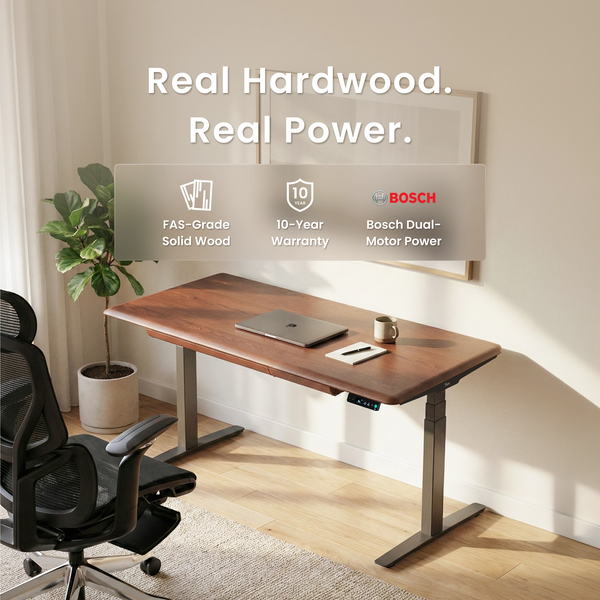
The 9am Home Pesk Pro Hardwood Home Office Electric Standing Desk uses FAS-grade hardwood and is available with American Ash or American Walnut tops. Its 3D curved edge is designed to create a more natural contact point along the front of the desk, while the electric frame adds sit-stand functionality.
Look for a Stable Desk Frame for Everyday Use
A durable desktop still needs reliable support. If the desk will carry monitor arms, multiple displays, or other heavier equipment, check that the frame and desktop suit the intended load; this desk measurements guide also explains how width, depth, height, and usable space affect an everyday desk setup.
Choose a Surface Finish That Is Easy to Maintain
The finish determines more than appearance. It also affects how the desktop responds to everyday cleaning, moisture, and stains. For example, someone who regularly keeps coffee beside a keyboard may prefer a well-sealed surface that is easier to wipe clean, while an oil-finished desk may suit users who do not mind occasional maintenance.
There is no single best finish for every wood desk. The better choice is one that matches both the look you want and the level of upkeep you are willing to maintain.
Consider Sit-Stand Flexibility for Long-Term Use
Working habits often change long before a desk needs replacing. A fixed-height setup that feels suitable today may become less practical if you later want to alternate between sitting and standing, and this sitting desk to standing desk setup and ergonomic guide explains how to make that transition gradually.
The 9am Home Dora Pro Hardwood Smart Electric Standing Desk is available with an American Oak hardwood top, while a White Birch plywood option is also offered. It combines electric height adjustment with presence-based reminders, an integrated drawer, and hidden cable management. For users who regularly switch between seated work and standing tasks, these features add flexibility without requiring a separate workspace setup.

Conclusion
Caring for a wood desk is mostly about prevention rather than frequent treatment. Protect high-use areas, clean spills promptly, use as little moisture as the finish requires, and avoid unnecessary heat or harsh cleaners.
Just as importantly, follow the care requirements of the actual finish rather than treating every wooden surface the same way. A few consistent habits can prevent many of the stains, scratches, and finish problems that are harder to correct later.
FAQ
Can You Use Vinegar to Clean a Wood Desk?
Usually, it is safer to avoid vinegar unless the manufacturer specifically recommends it. Its acidity can dull or damage some wood finishes, especially with repeated use. For routine cleaning, a soft cloth lightly dampened with water or a mild, finish-safe cleaner is generally a better choice.
Can You Use Disinfectant Wipes on a Wood Desk?
Not all disinfectant wipes are suitable for wood. Some contain alcohol or other chemicals that may dry out, discolour, or weaken certain finishes. Check the desk manufacturer’s guidance first, and avoid leaving excess liquid on the surface.
How Do You Remove Water Rings From a Wood Desk?
Start by identifying whether the mark is on the finish or has penetrated deeper into the wood. Light surface rings may improve with gentle drying and a finish-safe treatment, but dark or persistent stains may require professional repair or refinishing. Avoid aggressive DIY methods that involve high heat or abrasive materials.
How Can You Tell if a Wood Desk Is Sealed or Unfinished?
A sealed surface usually feels smoother and is less absorbent, while unfinished wood often feels more natural or slightly porous. If you are unsure, check the product specifications or manufacturer’s care instructions before applying water, oil, or cleaning products.
Can a Monitor Arm Damage a Wooden Desktop?
Yes, especially if the clamp concentrates too much pressure in one area. Heavy monitors or overtightened clamps can leave dents, compress the wood, or damage the finish. A protective plate or pad can help spread the load, but always check the desktop thickness and mounting limits first; for two-screen workstations, this dual monitor setup guide also covers desk space, monitor-arm mounting, and stability in more detail.
What Should You Do if a Wood Desk Starts to Warp?
First, reduce exposure to excessive moisture, heat, or large humidity changes, as these are common causes of wood movement. Minor changes may stabilise once the indoor environment becomes more consistent, but significant warping, cracking, or structural movement should be assessed by the manufacturer or a qualified furniture repair specialist.

Leave a comment