






Best Desk Accessories for Home Office Setup 2026
Working from home looks different for everyone. A simple single-monitor setup may only need better screen positioning and basic cable control, while dual-monitor or sit-stand desks often require more planning around space, power and stability.
With remote work still common across Australia, the most useful desk accessories are not just what fits on your desk, but what genuinely improves how you work day to day. This guide covers the main types of desk accessories, their benefits, and how to choose the right setup for comfort, organisation and productivity.
What Types of Desk Accessories Are Available?
Most home office desk accessories fall into five practical categories, each addressing a different part of your workstation.
-
Ergonomic accessories: Monitor risers, monitor arms, footrests and similar products that help improve equipment positioning and comfort.
-
Monitor and laptop accessories: Monitor arms, laptop stands and risers that help organise screens and make better use of desktop space.
-
Charging and power accessories: Desk-mounted power boards and accessible charging points for laptops, phones and other devices.
-
Cable management accessories: Cable trays, clips and organisers that keep power boards, adapters and excess cable away from the desktop and floor.
-
Desk storage and organisation accessories: Monitor risers, racks and organisers that provide a dedicated place for stationery and everyday work items.
A basic single-screen setup may only need one or two of these, whereas a standing desk with multiple monitors and several powered devices will usually benefit from a more complete combination.

What Are the Benefits of Desk Accessories?
The right desk accessories can improve several parts of a home office at once, from screen positioning and available workspace to organisation and everyday convenience.
Improve Comfort and Ergonomics
Desk accessories help position screens and frequently used items at a more comfortable viewing and reach height. WorkSafe Queensland recommends keeping the monitor at or just below eye level and about an arm’s length away, which a monitor arm or riser can help achieve when the original stand has limited adjustment.
Keep Your Workspace Organised
Storage racks and cable trays give chargers, stationery and smaller devices a defined place rather than leaving them scattered across the desk.
This is particularly useful when a home office is set up in a bedroom, study or spare room that also serves another purpose. Being able to tidy or pack up the desk quickly can make the whole space easier to use.
Free Up More Desk Space
Monitor arms reduce the amount of desktop area taken up by bulky monitor stands, while monitor risers create usable storage underneath the screen.
Both options make better use of vertical space, which can be especially helpful on smaller desks where a keyboard, laptop, notebook and other work essentials already compete for room.
Make Daily Work More Convenient
Small improvements can make everyday work noticeably easier. Accessible power points, controlled cables and organised storage reduce the need to reach behind furniture, search for charging leads or move several items whenever you need clear desk space.
Improve Focus and Productivity
Desk accessories do not improve focus automatically, but they can remove unnecessary visual clutter and physical interruptions. In a shared room, for example, a privacy panel can help visually separate the workstation from the surrounding living area. Better cable and storage organisation can also make it easier to begin and finish the working day with a clear workspace.
Best Desk Accessories for a Home Office in 2026
The most useful accessories depend on the specific problem you want to solve, so the following options cover common monitor, storage, charging, cable management and flexible workspace needs.
Monitor Arm for Flexible Screen Positioning
A monitor arm is particularly useful when you regularly change screen height, viewing distance or orientation, including when moving between sitting and standing.
The 9amHome Flexible Adjustment Single Monitor Arm Desk Mount supports monitors from 17 to 34 inches weighing 2 to 9 kg. It provides height, tilt, swivel and 360-degree rotation adjustment, while built-in cable clips and a concealed rear cable channel help keep monitor leads controlled.
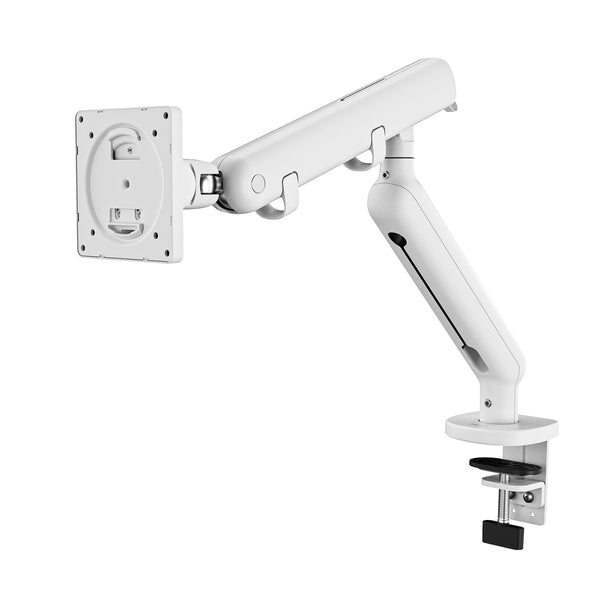
For a home office where screen position changes throughout the day, a monitor arm offers considerably more flexibility than relying on the monitor's original stand.
Monitor Riser for Ergonomic Desk Organisation
If your screen position stays mostly fixed but the monitor sits too low, a riser can provide a simpler solution.
The 9amHome Two-Tier Metal Computer Monitor Riser Desk Organizer raises the monitor by approximately 11 cm. Its 80 cm-wide steel design also creates a lower tier that can hold a keyboard, laptop, stationery or other office essentials.
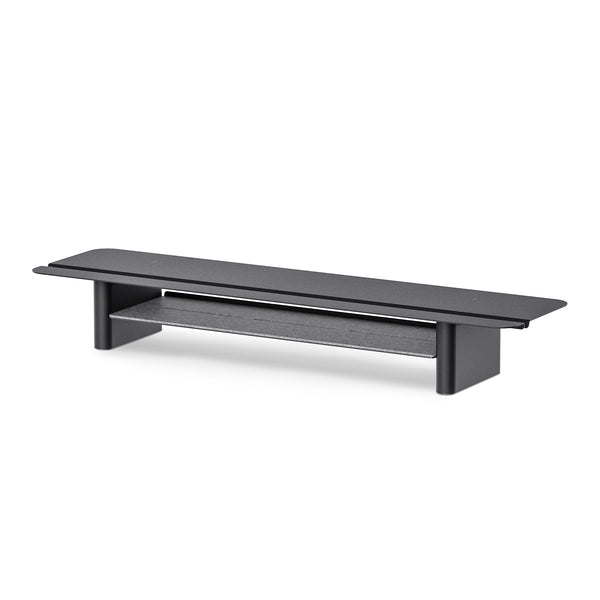
This option suits users who want additional screen height and more usable desk space without needing the movement or mounting system of an articulated arm.
Monitor Riser with Storage for a Tidy Desk
For workstations with more stationery, notebooks and small electronics, storage can be just as important as screen height.
The 9amHome Multifunctional Office Desk Storage Rack Monitor Riser combines hardwood and metal in an 80 × 20 × 10 cm structure. Its multiple storage areas make use of the space below and around the monitor for notebooks, files, pens and everyday electronic devices.
It is a practical option for users who want a tidier desk without adding several separate organisers across the desktop.
Desk Power Board for Easy Charging
Power points are often positioned behind furniture or below the desk, which can be inconvenient when you regularly connect and disconnect laptops, phones and other devices.
The 9amHome Desk Clamp Power Board Strip attaches directly to the desk edge and provides three Australian GPOs, one USB-A port and one USB-C port, along with surge protection.
Keeping frequently used connections within easy reach is particularly useful for laptop-based setups, shared home offices and workstations where devices are regularly unplugged and taken away.
Cable Tray for Under-Desk Cable Management
Cable clips are useful for guiding individual leads, but power boards, adapters and excess cable usually need a larger storage area.
The 9amHome Under Desk Cable Management Tray Wire Organiser measures 60 × 15 × 6 cm and uses powder-coated cold-rolled steel. It provides space for power boards, larger laptop chargers and controlled cable slack beneath the desktop.
Keeping these components off the floor is particularly useful with a height-adjustable desk, where cables need enough freedom to move as the desk rises and lowers. If cable clutter is already a major issue in your workspace, these desk cable management ideas provide additional ways to organise charging leads, power cables and adapters.
Desk Privacy Panel for Better Focus
A workstation located in a living room, shared study or family area may benefit from a clearer visual boundary.
The 9amHome Robin Series Acoustic Privacy Panel clamps to the rear edge of Robin and Robin Pro desktops and is available in 1.2 m, 1.4 m and 1.6 m sizes. Its acoustic felt provides visual separation while also helping absorb some background sound and echo.
Because the panel is fixed directly to the desktop, it moves up and down with the standing desk rather than remaining at a fixed height.
Caster Wheels for a Flexible Standing Desk
If your home office is also a spare room, study area or multipurpose living space, being able to reposition the desk can make the room more flexible.
The 9amHome M8 Threaded Lockable Caster Wheels rotate through 360 degrees, feature locking brakes and support up to 150 kg per set of four. Their soft-edged wheels are designed to move across hard floors while helping reduce the risk of scratches.
They suit 9amHome standing desks and furniture with compatible M8 threaded legs. Keep in mind that installing the casters increases the desk height by approximately 5 cm, which may affect the lowest available working height.
Quick Comparison of the Best Home Office Desk Accessories
|
Accessory |
Best For |
Key Benefit |
|
Monitor Arm |
Adjustable monitor setups |
Flexible screen positioning |
|
Monitor Riser |
Fixed monitor setups |
Raises the screen and adds space |
|
Storage Riser |
Desks with small work items |
Adds storage below the monitor |
|
Power Board |
Multi-device setups |
Keeps charging within easy reach |
|
Cable Tray |
Standing desks |
Stores power boards and cable slack |
|
Privacy Panel |
Shared workspaces |
Adds visual separation |
|
Caster Wheels |
Flexible room layouts |
Makes the desk easier to move |
How to Choose Desk Accessories for Your Home Office
Instead of adding accessories one by one, consider how each item fits your equipment, available space and daily working habits before deciding what you actually need.

Choose Accessories Based on Your Work Setup
Start with your daily devices and how you switch between tasks.Laptop users often benefit from raising the screen and using an external keyboard and mouse, especially for longer work sessions. WorkSafe Queensland also recommends a separate monitor, keyboard and mouse for extended laptop use.
Multi-monitor setups need stronger monitor support, enough desk weight capacity, easy access to power, and proper cable management. Sit-stand desks also require accessories that stay stable and functional across the full height range.
Consider Your Desk Size and Available Space
Measure the desktop before buying accessories, including width, depth, rear edge space, clamp clearance and under-desk clearance, as monitor arms, power boards and privacy panels may compete for the same edges, while cable trays also need space from frames, drawers and lifting columns.
If you are still deciding how much workspace you need, 9amHome's desk size and measurements guide explains how desktop width and depth requirements change depending on monitors, laptops and other equipment.
Prioritise Comfort and Ergonomics
Do not choose an accessory simply because it is labelled ergonomic. Use it to address a specific workstation issue, such as a screen that sits too low, excessive reaching or insufficient room around the keyboard.
Safe Work Australia recommends designing work so people can vary their posture and movement rather than remaining in one position for prolonged periods. Accessories should support that flexibility rather than making the workstation harder to adjust.
Check Compatibility With Your Desk and Devices
Always check mounting systems, dimensions and weight limits before ordering.
For monitor arms, confirm the monitor’s VESA pattern and weight. For caster wheels, check the thread size. Privacy panels may only fit specific desk models, while cable trays and power accessories require sufficient clearance around the frame.
Compatibility becomes especially important on a standing desk because an accessory that fits correctly at sitting height may obstruct the frame or cables once the desktop begins moving.
Common Desk Accessory Problems and How to Avoid Them
Even useful accessories can make a workstation less practical when they are poorly sized, overloaded or installed without considering how the desk operates.
Choosing Accessories That Do Not Fit Your Desk
Clamp-mounted products require enough desktop thickness and edge clearance for secure installation.
The 9amHome monitor arm, for example, includes both clamp and grommet mounting options. The C-clamp fits desktops from 10 to 80 mm thick, while the monitor itself must support a 75 × 75 mm or 100 × 100 mm VESA pattern.
Measuring first helps avoid installation problems caused by the desktop, frame or monitor design.
Buying Too Many Accessories for a Small Desk
A compact desk can become harder to use when every accessory competes for the same limited surface area. Start with the problem that affects your workstation most—if the monitor sits too low, address screen positioning first; if cables dominate the floor, improve cable management next.
Leaving some clear working space is often more useful than adding another organiser simply because there is technically room for it.
Overloading the Desk With Monitors and Equipment
Dual monitors, monitor arms, laptops, speakers and other equipment can add considerable weight, so check both individual accessory limits and the desk's total weight capacity.
For equipment-heavy home offices, the 9amHome Pesk Pro Hardwood Standing Desk uses Bosch dual motors, offers a 63 to 128 cm height range and has a 125 kg dynamic load rating. Its dual-motor frame and more substantial legs and feet provide a practical base for multi-device sit-stand setups where stability during height adjustment matters.
Ignoring Cable Movement on a Standing Desk
A cable that looks fine at sitting height can become tight when the desk rises, so always plan for movement, not just a fixed position. Keep power boards and larger adapters secured under the desk, and leave enough slack between the desk and the wall power point for smooth adjustment.
After setup, raise and lower the desk fully to check everything moves freely. Cables should never become tight enough to strain a monitor, dock, charger or power point.
Conclusion
The best desk accessories for a home office in 2026 are the ones that solve specific problems, whether that means improving screen positioning, freeing up desk space, simplifying charging, controlling cables, adding privacy or making a standing desk easier to move.
Start with your work style and desk dimensions, confirm compatibility and add accessories gradually. A few well-chosen products will usually create a more comfortable and practical home office than filling the desk with equipment you rarely use.
FAQs
These common questions cover compatibility, ergonomics and everyday use when adding accessories to a home office or standing desk setup.
Do Standing Desks Need Different Accessories?
Not entirely, but accessories used on a standing desk need to work throughout its full height range. Cable trays, monitor mounts, privacy panels and power accessories should remain secure without restricting movement.
Should I Choose a Monitor Arm or a Monitor Riser?
Choose a monitor arm if you frequently adjust screen height, distance or angle. A monitor riser is better if the screen stays mostly fixed and you mainly need additional height or storage underneath.
Can Desk Accessories Affect a Standing Desk's Height Adjustment?
Yes. Heavy equipment, tight cables or poorly positioned under-desk accessories can interfere with movement. Check weight limits and clearance, then test the desk through its full height range after installation.
What Desk Accessories Help Reduce Neck and Shoulder Strain?
A monitor arm or riser can help position the screen around eye level or slightly below. Laptop users may also benefit from an external keyboard and mouse so the screen and input devices can be positioned separately.
What Accessories Work Best for Shared Workspaces?
Privacy panels, compact storage, accessible power and cable management are particularly useful. They help define the workstation and keep work equipment contained rather than spreading across a shared room.
How Do I Stop Cables Pulling When Raising a Standing Desk?
Secure the power board and excess cable beneath the desktop, leave enough controlled slack between the desk and wall power point, and test all cables with the desk at its maximum height before regular use.

Leave a comment