






How to Set Up a Home Office for Under A$2,000 in Australia
Working from home does not require an expensive room filled with premium furniture. With an A$2,000 budget, excluding your computer, you can build a practical and comfortable home office by putting more of the budget into furniture you use every day and keeping secondary accessories simple.
A good budget home office setup should balance desk space, seating, screen position, lighting and organisation. Planning the full workspace before buying also helps you avoid spending too much on accessories that can easily be added later.

Home Office Setup Under A$2,000: Budget Breakdown
Start by deciding how much of the budget should go into each part of the workspace. These figures are planning allowances rather than fixed retail prices, giving you some flexibility for different product options, promotions and smaller extras.
| Home Office Item | Suggested Budget |
| Electric Standing Desk | A$900 |
| Ergonomic Office Chair | A$500 |
| Monitor Arm or Riser | A$150 |
| Desk Lighting | A$100 |
| Cable Management & Storage | A$100 |
| Accessories & Decor | A$150 |
| Planned Spend | A$1,900 |
| Budget Buffer | A$100 |
| Total Budget | A$2,000 |
Around 70% of the planned spend goes towards the desk and chair because they form the core of the workstation. The A$100 buffer also gives you room for price changes, delivery costs or an accessory you discover you need after setting everything up.
Before buying, measure the available floor and wall space and consider how much equipment needs to remain permanently on the desktop. The desk measurements guide can help you compare practical dimensions for different home office layouts.
Essential Furniture for a Budget Home Office
Electric Standing Desk — Around A$900
The desk is the foundation of the workspace, so usable surface area, stability and adjustment should come before decorative features. An electric standing desk also gives you the flexibility to change working height during the day instead of staying in the same position for every task.
You might sit for detailed computer work and raise the desk for a call or shorter task. If you are moving from a fixed-height desk, the sitting desk to standing desk guide covers practical ways to introduce sit-stand working gradually.

Within this budget, the 9am Home Robin Pro Sit Stand Desk is suitable for users who want a larger adjustable workstation. It features dual motors, three-stage legs and a load capacity of up to 125 kg, with several desktop sizes for different home office setups.
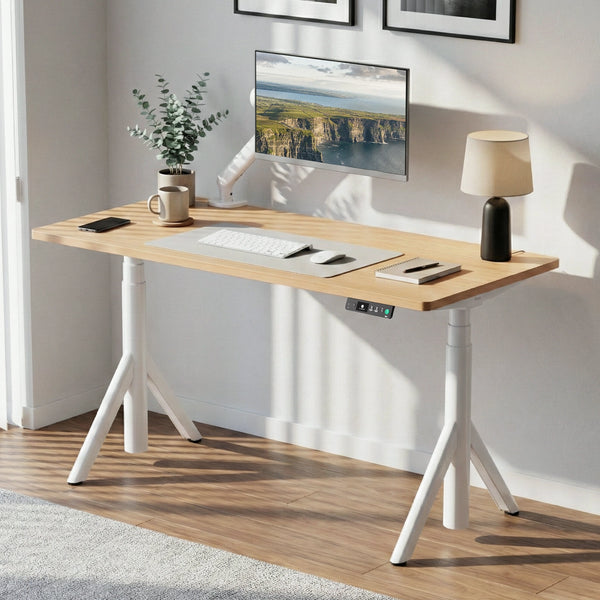
Desktop size should still reflect the room and the equipment you actually use. A laptop-only setup can remain compact, while dual monitors, speakers and regular paperwork generally require more width and depth.
Ergonomic Office Chair — Around A$500
A sit-stand desk does not remove the need for a suitable ergonomic office chair because most people will still spend part of the working day seated. Rather than choosing a chair based only on cushioning or appearance, look for useful adjustments that make it easier to match the chair to your desk and sitting position.
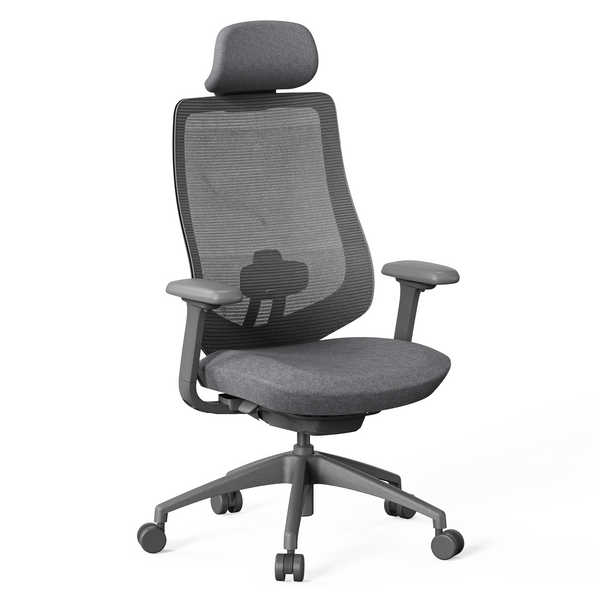
 The 9am Home Newton Ergonomic Chair sits within this A$500 allowance and offers adjustable features designed for different sitting positions. Once the chair is set up, adjust the desk so your forearms can rest comfortably while typing and your shoulders remain relaxed.
Affordable Accessories to Complete Your Home Office
After the main furniture is in place, use the remaining budget to improve screen position, lighting and organisation. These smaller additions should solve practical problems rather than simply filling the desk with accessories.
Monitor Arm or Monitor Riser — Around A$150
A monitor riser and monitor arm solve similar problems in different ways. Your choice should depend on how often the screen needs to move and whether extra desktop storage would be useful.
| Option | Best For | Main Advantage |
| Monitor Riser | Fixed single-monitor setups | Simple height increase with storage underneath |
| Monitor Arm | Sit-stand or flexible setups | Greater control over screen height and position |
The 9am Home Multifunctional Monitor Riser is a straightforward option for a fixed workstation. A monitor arm may make more sense if you regularly reposition the display, use multiple monitors or change between sitting and standing.

Desk Lighting — Around A$100
Good lighting should make the work surface easy to see without creating strong reflections on the screen. Where possible, use the room's existing natural light and add an adjustable task lamp for darker afternoons, evening work or reading.
Brightness adjustment is generally more useful than simply choosing the most powerful lamp. Adjustable colour temperature can also be helpful when the same room is used for work during the day and other activities in the evening.
Cable Management and Storage — Around A$100
Cable management becomes more important when a standing desk changes height because power and device cables need enough slack to move safely. A small amount of planning underneath the desk can also keep the workspace tidier without adding bulky storage furniture.
A simple setup can include:
- An under-desk tray for a power board, adapters and excess cable
- Cable clips or ties to guide individual leads
- Enough cable slack for the desk at its highest position
- A small organiser for frequently used stationery
The 9am Home Under Desk Cable Management Tray measures 60 × 15 × 6 cm and is designed to keep items such as power boards, chargers and excess cables underneath the desktop. Its current A$46.90 price also leaves room within the A$100 allowance for cable clips or a small organiser.

Desk Accessories and Decor — Around A$150
The final part of the planned spend can cover practical extras such as a desk mat, laptop stand, wrist rest or headphone holder. A small plant, artwork or shelf can also make the workspace feel more personal, but these additions should complement the setup rather than take money away from everyday essentials.


Leave a comment