






Single vs. Dual Motor Standing Desks: Which Is Better?
A single-motor standing desk uses one motor to move both lifting columns, while a dual-motor desk normally uses one motor for each leg. Single-motor models often suit lighter, more compact workstations, whereas dual motors are commonly chosen for wider desktops, heavier equipment and frequent height changes.
While both designs can meet basic sit-stand needs, a dual-motor desk is generally the better long-term choice for users who value smoother movement, stability and room for future upgrades.
What Is the Difference Between Single and Dual Motors?
The main difference is how the lifting force is generated and transferred across the frame. Motor configuration can affect capacity, movement and price, but it works alongside the quality of the lifting columns, feet, controller and desktop.
How Does a Single Motor Standing Desk Work?
A single-motor standing desk generally has one electric motor connected to both lifting legs through a drive shaft. When you press the controller, the motor turns the shaft so the two columns rise or lower together.
Because the design uses fewer powered components, it can help keep the desk simpler and more affordable. Not all single-motor standing desks perform the same, but many models tend to have slower lifting speeds, limited stability, and more shaking when adjusting height or working at higher positions. This can create distractions, interrupt your working rhythm, and make them less suitable for demanding work setups.
How Does a Dual Motor Standing Desk Work?
A dual motor standing desk usually places one motor in or beside each lifting column. A control box keeps the motors synchronised so both sides move at the same time.
By sharing the lifting work across both sides of the frame, dual motors generally provide stronger lifting performance, smoother height adjustment and greater stability under load. They also tend to operate more quietly, as neither motor carries the full lifting demand alone, making the design well suited to frequent use in Australian home offices.
Single vs. Dual Motor Standing Desk Comparison
The table below summarises common differences. These are general tendencies rather than rules that apply to every desk.
|
Feature |
Single Motor |
Dual Motor |
|
Weight capacity |
Suitable only for lighter setups |
Better for heavier setups |
|
Price |
Lower upfront cost |
Higher upfront cost |
|
Noise |
May be louder under load |
Usually quieter and smoother |
|
Lifting speed |
Generally slower |
Generally faster |
|
Stability |
Prone to wobbling during use |
Usually provides better stability |
|
Long-term use |
Best for occasional adjustment |
Better for frequent daily use |
A dual motor standing desk is the better long-term choice for most users, offering smoother height adjustments and better stability. While single motor desks are cheaper, they can be a short-term compromise with slower lifting, more wobble, and limited room for future upgrades. For a more stable and comfortable workspace, a dual motor desk is the recommended option.
Which Performance Factors Matter Most?
Start with the weight rating, but do not compare the number in isolation. Add the weight of your desktop computer, monitors, monitor arms, speakers and other equipment, then leave some capacity in reserve. A desk that is constantly used close to its limit may not move as smoothly as it does with a lighter setup.
Also check how the desk starts, stops and travels at standing height. A dual-motor system generally distributes the lifting force more evenly across both sides, helping the desktop accelerate, move and stop more smoothly with less monitor shake. A dual-motor design also tends to operate more quietly and consistently under load, so for noise, look for a published figure measured while the desk is moving, especially when the workstation will sit in a bedroom, shared living area or quiet study.
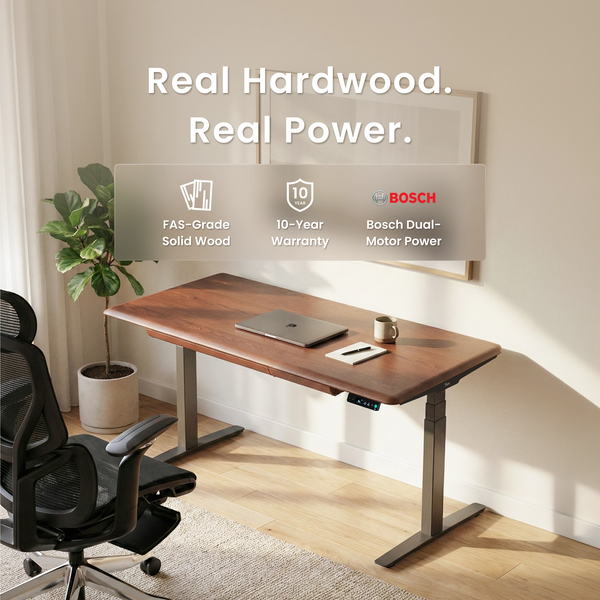
The 9amHome Pesk Pro Standing Desk shows how a dual-motor system can be combined with a heavier premium desktop. It uses Bosch dual motors and lists a 63–128 cm height range, a 125 kg dynamic load and a travel speed of 38 mm/s. Its FAS-grade hardwood surface, integrated drawer and cable tray give it a different role from a basic dual-motor frame.
Should You Choose a Single or Dual Motor Desk?
Your equipment and working routine should guide the decision. Think about what is already on the desk, what you may add later and how often you expect to adjust its height.
When Should You Choose a Single Motor Standing Desk?
A single-motor standing desk can be a practical choice for a lighter setup with a laptop or one monitor. It is suitable for compact home offices, occasional work-from-home use and buyers who want basic sit-stand adjustment without paying for more lifting capacity than they need.
A single-motor standing desk can be a budget-friendly choice for basic laptop setups, but it often comes with compromises, including slower lifting, less smooth movement, and reduced stability over time. As your setup grows with monitor arms or extra accessories, a dual motor desk offers better performance and avoids the need for an expensive upgrade later.
When Should You Choose a Dual Motor Standing Desk?
If your budget allows, a dual-motor electric standing desk is usually the better long-term choice. It offers smoother, quieter and more stable adjustment, making it suitable not only for heavier setups but also for users who value product quality, frequent use and room for future upgrades. 
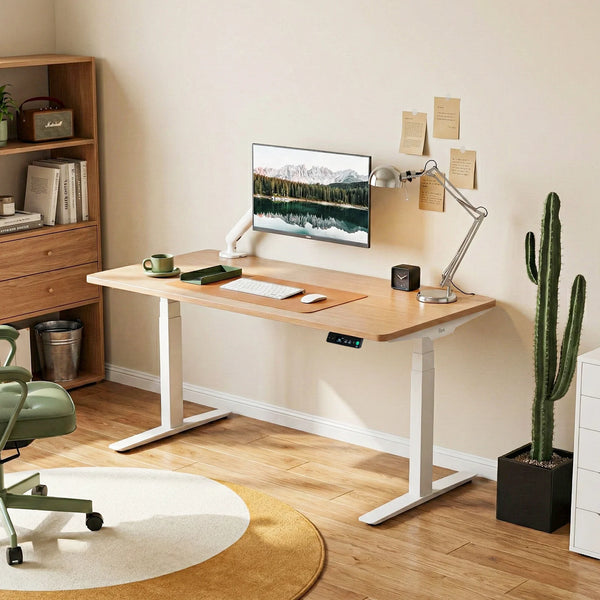
For a practical dual motor sit stand desk, the 9amHome Pesk Standing Desk uses Bosch motor technology and lists a 63–128 cm height range, 38 mm/s travel speed, a 125 kg weight capacity and a noise level below 40 dB while moving. Its melamine desktop makes it a more straightforward everyday option than the hardwood Pesk Pro.
What Else Should You Check Before Buying?
Motor count is only one part of a standing desk. Height range, desktop dimensions, controls, safety features and local support can have a greater effect on everyday comfort.

Height Adjustment Range
The desk needs to place your keyboard at a comfortable height while both sitting and standing. When choosing an electric sit stand desk, check that its height range suits your body proportions rather than focusing only on motor power or load capacity.
This is particularly important for taller, shorter or shared-desk users. A dual-motor desk with an unsuitable minimum or maximum height will not provide a good ergonomic fit. The 9amHome guide to an ergonomic desk setup explains how desk, chair, monitor and keyboard positions work together.
Whatever motor system you choose, the goal is not to stand all day. Safe Work Australia advises designing workstations so seated and standing workers can vary their posture and movement.
Desktop and Frame Size
Measure the available floor area before deciding on desktop width. Leave enough space for your chair, nearby doors, storage units and cables that move with the desk. Depth also matters because it affects monitor viewing distance and the amount of room available for your keyboard and other equipment.
Check that the desktop is compatible with the frame rather than fitting the widest top possible. A large surface adds weight and leverage, particularly at standing height. The sitting desk to standing desk guide offers a broader checklist for assessing floor space, equipment, cable layout and daily sit-stand use.
Memory Presets and Safety Features
Memory presets allow users to save preferred sitting and standing heights. They are particularly useful for shared desks or anyone who changes position several times during the day, as the desk can return to a consistent height without repeated manual adjustment.
Collision detection is designed to stop or reverse movement when the desk meets an obstacle. It can help protect chairs, drawer units and items stored under the desktop. A child lock is also useful in family homes where the controls may be reached accidentally.
The 9amHome Dora Pro Hardwood Smart Electric Standing Desk is aimed at users seeking a more integrated smart workspace. It is available with an American oak top or a white birch plywood top and includes a full-colour touch controller, discreet wire management, built-in collision detection and a smart child lock.
The desk also lists a 125 kg load capacity, 38 mm/s travel speed and operating noise below 40 dB.
Warranty and Australian Support
Local warehousing and customer support can make delivery, troubleshooting and access to replacement parts easier. Check where the desk ships from, how support is contacted and whether replacement components are available in Australia.
Read the detailed warranty rather than relying only on the largest number displayed on the product page. The current 9amHome warranty provides:
-
10 years of cover for desk frames and motors
-
Five years of cover for desktops
-
Three years of cover for hand controllers, sensors and other control parts
The warranty applies to the original purchaser and is subject to the published conditions and exclusions. Pesk orders are listed as shipping from a New South Wales warehouse.
Conclusion
A single-motor standing desk can be a sensible choice for a light, compact workstation and a more limited budget. However, buyers planning to use their desk regularly or keep it for several years may find the additional cost of dual motors worthwhile.
Compare the complete desk rather than making the decision on motor count alone. Height range, capacity, movement, stability, controls, desktop size and warranty all contribute to how the desk performs in an Australian home office.
FAQ
Is a dual motor standing desk worth it?
Yes. A dual-motor standing desk is often worth the extra cost because it typically offers smoother, quieter and more stable height adjustment. It is a stronger long-term investment for users who value dependable daily performance, product quality and flexibility for future workspace upgrades.
Is a dual motor standing desk more stable?
A dual-motor design can provide more balanced lifting under load because each side has its own motor. However, standing-height stability also depends on the lifting columns, feet, frame design, desktop size and correct assembly.
Does a dual motor standing desk use more electricity?
Not necessarily in a way that makes a meaningful difference to everyday use. Actual consumption depends on motor efficiency, the weight being lifted, adjustment frequency, travel time and standby power. Check the electrical specifications of the individual model rather than estimating energy use from motor count alone.
Is a dual motor desk better for two monitors?
It is often a practical option for two monitors, particularly when they are mounted on a heavy monitor arm or used with a desktop computer. Add the weight of the complete setup and choose a desk with enough rated capacity and suitable stability at your working height.

Leave a comment